Running two or three coding agents on one project gets messy fast: separate terminals, separate approval prompts, separate histories. AgentPlane is a new open-source attempt at putting them under one roof. I couldn’t open the repository directly, so this is based on an explainx.ai write-up of the README. That write-up says its author hasn’t run the tool either, and neither have I. Treat this as an overview, not a review.
The basics
- What: “A local control plane for coding agents,” per the README.
- License: Apache-2.0.
- Repo:
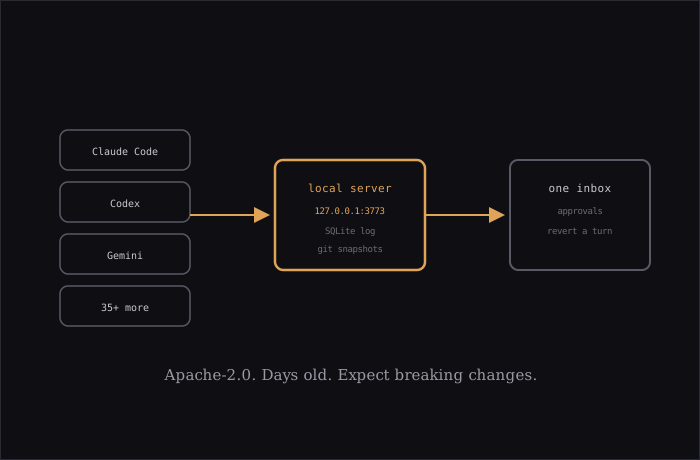
composio-community/agentplane, created October 6, 2026. Launch coverage dates to October 8. - Agents: Claude Code, Codex, Cursor, Gemini, Pi and 35+ others.
- Who made it: the write-up attributes the launch to two named people but treats that as unverified, so I won’t repeat the names as fact. The repo’s organization name and the Composio integration suggest a Composio connection.
How it works
A single local Node server runs the agent processes, git operations and state. The browser UI is just a client, so agents keep running if you close the tab. The browser talks to the server over one WebSocket limited to 127.0.0.1 with origin checks. State lives in SQLite as an append-only event log, and checkpoints use git refs.
Each agent connects through its own adapter. According to the write-up, Claude goes through the Agent SDK, Codex through codex app-server, Pi over RPC, OpenCode through opencode serve, and most others through ACP. The stack is Node 24+, pnpm, React 19, Vite and SQLite, with the server on port 3773.
Features that caught my eye
- One inbox for pending approvals across all threads.
- Project-level “always allow” rules shared across agents.
- Switching a thread between agents, carrying the context over.
- A snapshot per turn, with a Revert button that undoes only that turn.
- Optional git worktrees per thread, plus commit, push and PR actions from the thread.
- Three modes per thread: Supervised, Auto-edit and Full access. The README reportedly advises Full access only inside a worktree.
I find the per-turn revert the most practical idea here. If you’ve ever had an agent make five good edits and one terrible one, you know why. It pairs naturally with Codex CLI’s worktree support.
Security claims
Per the README as relayed: only signed-in browsers can reach it, the session cookie is HttpOnly and SameSite=Strict, the ~/.agentplane folder is owner-only, API keys stay off the browser and off agent command lines, project setup commands need approval, and paired phones can’t open terminals, commit, push or change settings. These are the project’s claims. I haven’t audited any of them.
Caveats
- The README says: “Early and moving fast; expect breaking changes.”
- Only build-from-source installs are documented (
pnpm installthenpnpm dev). - The repo is days old with few stars.
- Some vendors restrict third-party harnesses. Check each agent’s terms before wrapping it in someone else’s tool.
If you juggle more than one agent, it’s worth a look on a throwaway project first. I’d wait a few releases before trusting it with anything important.
Source: explainx.ai.